
ActiveMQ management your whole team can use
HYTE Console gives every team member expert-level control of the messaging platform, with role-based permissions deciding which queues and topics each person can touch. Developers, operators, and support staff provision and manage their own destinations on demand, inside limits administrators set once. The engineers who commit code upstream to Apache ActiveMQ built it.
Self-service inside assigned limits · Permissions down to the queue and topic · 10,000+ servers from one install
The broker works. Managing it is the hard part.
Messaging infrastructure earns its keep by staying invisible. The work that makes it invisible is not: creating queues for a new application, granting a developer read access to one destination, tracing a message that never arrived, keeping test teams out of production without keeping them waiting.
Most teams handle that work with a patchwork: the broker's bundled web console on each host, JMX tools, shell access, and a spreadsheet of who has which password. Each broker version and each vendor adds another variant to learn. The people who can do the work become a bottleneck, and the people who need the work done wait.
HYTE Console replaces the patchwork with one interface. Administrators define who can see and do what. Everyone else serves themselves within those limits.
One console for:
- ActiveMQ across brokers and versions
- Queue, topic, and message administration
- Message search with permission checks
- User, group, and role management
- Self-service within assigned limits
- IBM MQ and HYTE MQ from the same install
A single pane of glass for every broker you run
HYTE Console sits beside your brokers, not inside them. People sign in through the web interface, automation calls the REST API, and both routes pass through the same roles and permissions before anything reaches a broker. The Console speaks each vendor's supported management protocol, and nothing is installed on the broker hosts.
Deploy the Console
Stand up one centralized installation. No back-end database, no per-broker agents, high availability patterns available.
Connect your brokers
Point the Console at your ActiveMQ brokers over the supported management interface. Add IBM MQ and HYTE MQ servers where you run them.
Map roles and go
Bind directory groups to Console roles. Your team signs in with existing credentials and works within assigned limits.
Broker hosts stay as they are. The Console reads and writes through published management interfaces, so upgrades to your brokers do not wait on it.
Situations every messaging team knows
Ten brokers, ten logins
Your environment outgrew the per-host web console. One interface now reaches every broker, every version, one sign-in.
A developer needs one queue
Grant read access to a single destination instead of shell access to the host. The permission stops at that destination.
A queue is backing up
Check depth and message flow across brokers from one place, then act on the destination without opening a shell on the host.
A message went missing
Search across destinations to locate it. Permission checks keep message content limited to the roles allowed to see it.
You run IBM MQ somewhere, too
Messaging environments accumulate vendors over years. One tool and one skill set manage ActiveMQ and IBM MQ side by side.
The middleware team is two people
Self-service moves routine queue and access requests off their plate while RBAC keeps the limits they set.
Migrating from IBM MQ to ActiveMQ?
The Console manages both sides of the move from the same interface, before, during, and after cutover. Read about IBM MQ migration
An access model your directory already understands
Role-based access control in HYTE Console maps your directory users and groups to Console roles, and each role carries granular permissions on the brokers, queues, topics, and functions it needs. One person administers a broker while another reads a single queue, and both work in the same interface without a shell account between them.
Directory-driven
Active Directory, LDAP, and Microsoft Entra ID supply identity and group membership. Link a directory group and access provisions itself.
Scoped by role
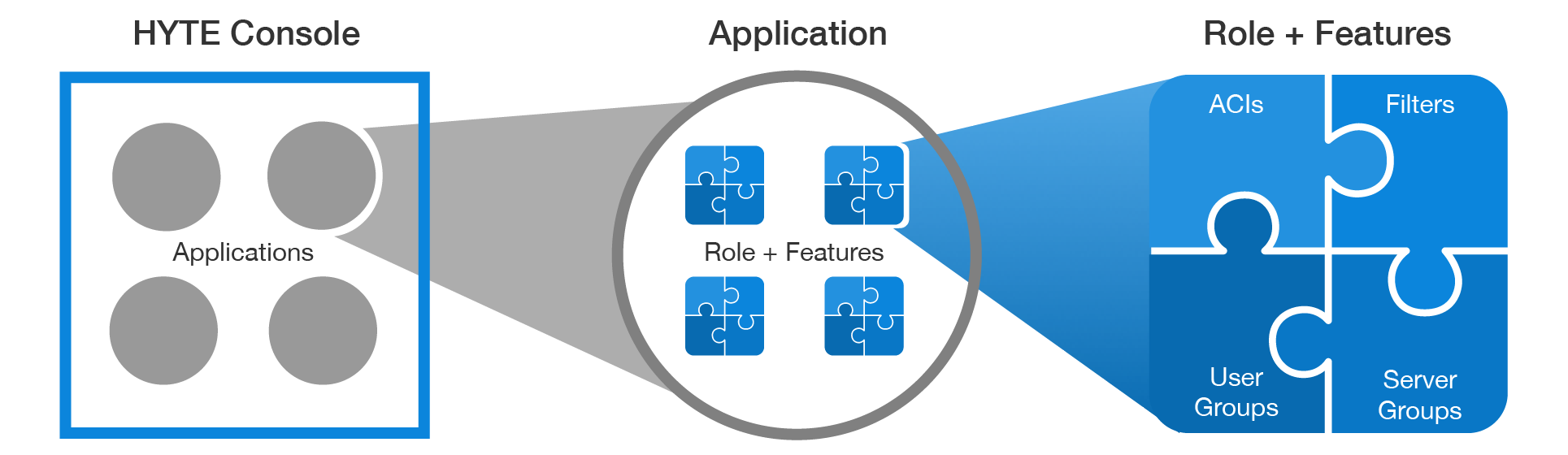
Every permission is granted item by item. A role combines permission groups with server groups and filters, so a person reaches what their work needs.
Presets to start from
Default roles and permission groups ship with the Console, built on production practice. Copy a default and adjust it rather than designing an access model from scratch.
Credentials stay protected
Server connection passwords are encrypted at rest, so granting Console access never means handing over broker credentials.
Administration, search, and control in one place
Unified administration
Create, configure, and manage queues, topics, and brokers from one web interface instead of per-host tools.
Multi-vendor, multi-version
Built for ActiveMQ first. The same installation manages IBM MQ and HYTE MQ where enterprises run them alongside.
Message search
Find messages across destinations with integrated search. Permission checks decide who sees message content.
Directory integration
Active Directory and LDAP supply usernames, passwords, and group membership. No parallel account store to maintain.
Encrypted credentials
Server connection passwords are encrypted at rest. Broker credentials never sit in plain text.
Self-service access
Developers and test teams handle their own routine tasks within assigned limits, without filing tickets or borrowing passwords.
Auto-rebalance
Spread client connections across the brokers in a cluster on a schedule, with rules, retries, and limits you set. Clients keep stock ActiveMQ libraries.
Health and loop tests
Run health reports across brokers, plus loop tests that send a message through one server or a whole cluster and confirm it comes back.
One permission model for people and scripts
Anything a team automates through HYTE Console runs against a REST API that spans the platform: brokers and clusters, destinations and messages, search, provisioning, and the identity objects behind access itself. A call arrives as a user, and that user's permissions decide what comes back.
One access model, two front doors
An endpoint refuses what the interface would have hidden. The role you granted a person is the role their scripts inherit, so automation cannot reach past the person who wrote it.
Rate limits on every caller
Callers past the limit receive a rate limit response instead of a broker under load. A runaway job slows itself, not your production traffic.
Sensitive services under a switch
Administrators enable or disable individual API services from a configuration panel, so a service can come down without the platform coming down with it.
One client pattern throughout
Consistent URL structure and status codes across services. A client written against one part of the API reads the rest without new conventions to learn.
API Surface
Documented for every service, with the same conventions across the set.
Where the open source console stops
Plenty of teams start with Hawtio. It attaches to a JVM, shows the broker's own management surface, and costs nothing. As environments grow it thins out: every connection is one JVM at a time, access rides on whatever the runtime allows, and a message search starts with guessing the right broker. HYTE Console starts there.
Hawtio
HYTE Console
Attaches to one JVM at a time through that JVM's Jolokia agent. ActiveMQ ships Jolokia from 5.9 forward, so a single broker is quick to reach.
Holds an inventory of your brokers in one view. Sign in once and work across brokers, versions, and vendors without reconnecting per host.
Roles come from the runtime it sits in: JAAS realms, JMX access control lists, and a Jolokia restrictor. Scope follows the broker's own security setup.
Directory groups map to Console roles. Roles scope users to named brokers, destinations, and functions, defined once and applied across the environment.
A web application plus a Jolokia agent in each JVM you want to reach.
One centralized deployment. No agent on broker hosts, no back-end database, high availability patterns available.
Anyone reaching the console gets the management surface the runtime exposes to them. Narrowing that means changing broker security configuration.
Developers and test teams get a role with the destinations and functions they need, defined in the Console without touching broker security configuration.
Browse destinations on the broker you are attached to.
Search across destinations, with permission checks deciding who sees contents.
Reads the broker's own browse operations, so the page size limit ActiveMQ applies, 400 messages by default, applies here too.
Search, copy, export, and import reach past the native browse limit, with selectors and transactions on the operations that support them.
Shows the connections on the broker you are attached to. Spreading them across a cluster is manual work or a separate tool.
Auto-rebalance redistributes client connections across cluster brokers on a schedule, with rules, retry and execution limits, and a simulate run before anything moves.
JVM runtimes exposing Jolokia, which puts IBM MQ queue managers outside its reach.
ActiveMQ and HYTE MQ, plus IBM MQ and Red Hat JBoss A-MQ and Fuse from the same installation.
Community mailing lists and issue trackers, on community timelines.
A commercial relationship with engineers who commit code upstream to Apache ActiveMQ.
Comparison reflects standard deployments. Hawtio behavior varies with its runtime and security configuration.
Vendor technologies supported
HYTE
- HYTE MQ
- HYTE OSS
- Kubernetes
Apache®
- ActiveMQ
- Karaf
- ServiceMix
IBM®
- IBM MQ
- WebSphere MQ
- MQSeries
Red Hat®
- JBoss A-MQ
- JBoss Fuse
Apache, ActiveMQ, ServiceMix, and Karaf are registered trademarks of the Apache Software Foundation. Red Hat, JBoss, A-MQ, and Fuse are registered trademarks of Red Hat, Inc. IBM, IBM MQ, and WebSphere are registered trademarks of IBM Corporation. Kubernetes is a registered trademark of The Linux Foundation.
Frequently Asked Questions
Does HYTE Console require an agent on each broker?
No. HYTE Console is a centralized deployment that connects to your ActiveMQ brokers, and to IBM MQ where you run it, over each vendor's supported management interface. Nothing is installed on the broker hosts, and no back-end database is required for the Console itself.
Does HYTE Console replace the ActiveMQ web console?
It replaces the need to use the per-broker web console for day-to-day work. One HYTE Console installation manages your full environment across brokers, versions, and vendors, and adds granular role-based access control and message search that the bundled console does not provide.
How does role-based access work with Active Directory?
HYTE Console integrates with Active Directory, LDAP, and Microsoft Entra ID for usernames, passwords, and group membership. Administrators map directory groups to Console roles, and each role scopes which resources a user can see and which functions they can perform.
Does HYTE Console store message data?
No. The Console reads message data from your brokers on demand and applies permission checks before displaying it. Message content stays on the brokers, and server connection passwords held by the Console are encrypted.
Which messaging platforms does HYTE Console manage?
HYTE Console manages Apache ActiveMQ, HYTE MQ, and IBM MQ, including WebSphere MQ and MQSeries generations, plus Red Hat JBoss A-MQ and Fuse. One installation handles multiple vendors and multiple versions at the same time.
What does auto-rebalance do in HYTE Console?
Client connections collect on a subset of brokers after restarts and maintenance, leaving some brokers loaded while others sit idle. Auto-rebalance redistributes those connections across the cluster on a schedule you set, with rules for which connection types move, retry and execution limits, and a simulate run that shows what a job would do before it does it. Clients keep stock ActiveMQ libraries.
Can HYTE Console work with a queue holding more messages than ActiveMQ will browse?
Yes. Apache ActiveMQ browses and copies up to a page size limit, 400 messages by default. HYTE Console adds search, copy, export, and import operations that reach past that ceiling, so a queue holding hundreds of thousands of messages stays workable. Permissions decide who can run each operation.
How large an environment can HYTE Console handle?
HYTE Console supports environments beyond 10,000 servers and beyond 10,000 queues and topics from a single installation, with high availability deployment patterns available. Teams running HYTE Console alongside HYTE support engagements can pair the tooling with 24/7 escalation when incidents go past what the interface resolves.
See HYTE Console on your kind of environment
A 15-minute conversation with a Messaging Platform Architect and a live walkthrough will show whether the Console fits your environment. Bring your questions about versions, vendors, and access control.